Everything You Need to Apply with Confidence.

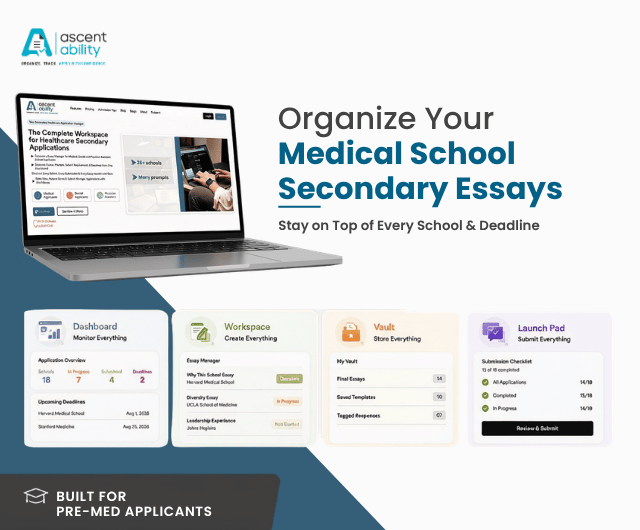
Built exclusively for Medical, Dental and Physician Assistant applicants, AscentAbility brings together your Dashboard, Workspace, Vault and Launch Pad into one intelligent workspace - helping you organize every school, manage every essay, track every deadline and submit every application with confidence.
Dashboard
Your Command Center
Application Insights
My Schools
Progress Tracking
School Priority
Deadline Priority
Workspace
Write. Organize. Edit.
Essay Manager
Prompt Library
Start Writing Drafts
Version History
Vault
Secure, Save, Restore.
Final Essays
Common Essays
Replicate
Tagged Responses
Launch Pad
Plan. Prepare. Launch.
Ready to Submit
Export PDF
Submit to Schools
Final Checklist
  • Home
  • Programs
  • Medical Applicants

Getting Started is Easy

Choose a plan, set up your workspace and start with confidence in just a few simple steps.

Choose Your Plan

Start with our free plan or unlock additional schools with a paid plan.

Create Your Workspace

Set up your account and personalize your dashboard for your application journey.

Add Your Schools

Select the schools you're applying to and automatically organize your prompts.

Write and Organize Essays

Draft essays, save versions and manage every response in one dedicated workspace.

Track Progress and Submit

Stay on top of deadlines, monitor completion and submit every application with confidence.

For applicants targeting multiple medical schools

Perelman School of Medicine at the University of Pennsylvania
Nova Southeastern University Dr. Kiran C. Patel College of Allopathic Medicine
Liberty University College of Osteopathic Medicine
Florida International University Herbert Wertheim College of Medicine
University of Arizona College of Medicine – Phoenix
University of Missouri-Kansas City School of Medicine
University of California, San Francisco, School of Medicine
Orlando College of Osteopathic Medicine
Loma Linda University School of Medicine
The University of Toledo College of Medicine and Life Sciences
Kentucky College of Osteopathic Medicine
Oakland University William Beaumont School of Medicine
University of Houston Tilman J. Fertitta Family College of Medicine
University of Alabama at Birmingham Marnix E. Heersink School of Medicine
University of Massachusetts Medical School

Medical School Admission Process

Understand the key stages of applying to U.S. medical schools - from your primary application and verification to secondaries, interviews, and admission decisions.
Submit Your Primary Medical School Application
Applicants typically apply through the centralized application service appropriate to their program: AMCAS for most U.S. MD programs, AACOMAS for osteopathic (DO) medical schools, or TMDSAS for participating Texas medical schools. Application opening and submission dates vary by service and cycle, so check the current requirements before applying.
Complete Application Verification
The application service reviews your submitted coursework and supporting academic records as required. Once processing and verification requirements are completed, your application information is made available to your designated medical schools according to the service's process.
Complete Medical School Secondary Applications
Medical schools may request a school-specific secondary application after receiving your primary application. Secondary applications commonly include additional essays and questions designed to assess your experiences, goals, interests, and fit with the school's mission. Secondary processes and requirements vary by school.
Prepare for Medical School Interviews
Applicants selected by individual medical schools may receive interview invitations. Research each school's mission and interview format, review your application, and prepare to discuss your experiences, motivation for medicine, and fit with the program.
Receive Admission Decisions
Following application review and interviews, medical schools make their individual admission decisions. If accepted, carefully follow the school's instructions, deadlines, and enrollment requirements.

Blogs for Medical School Applicants
Tips and insights for a stronger medical school application.
Trusted by future medical professionals

The dashboard showed me exactly what was complete, what was due next, and what I still needed to work on.

Having every prompt, draft, and revision in one workspace made writing secondary essays far less stressful.

Having all my final essays and templates saved in one place made applying to additional schools much easier.

Launch Pad gave me confidence before every submission. I knew exactly what was complete and what still needed attention.

2026-27

Application season

127

Applicants Joined

684

Essays Organized

42

Schools Added

Frequently Asked Questions

How It Works?

How It Works?

3 Questions 3 Questions

What is AscentAbility?

AscentAbility is an application management workspace built specifically for medical school applicants. It brings together your school list, application prompts, essays, drafts, deadlines, documents, and application progress in one connected workspace powered by Dashboard, Workspace, Vault, and LaunchPad.

AscentAbility is designed for medical school applicants applying through AMCAS, AACOMAS, or TMDSAS, including first-time applicants, reapplicants, gap-year applicants, international applicants applying to U.S. medical schools, and pre-health advisors supporting applicants.

Unlike Google Docs and spreadsheets, AscentAbility brings your essays, prompts, deadlines, documents, progress, and application workflow into one connected workspace. Instead of switching between multiple files and folders, you can organize, track, and manage your entire application from a single platform.

AMCAS & Admissions Timeline

AMCAS & Admissions Timeline

3 Questions 3 Questions
Medical School Application Strategy

Medical School Application Strategy

3 Questions 3 Questions
Medical School Secondary Essays

Medical School Secondary Essays

4 Questions 4 Questions
Pricing & Plans

Pricing & Plans

2 Questions 2 Questions
Privacy & Security

Privacy & Security

3 Questions 3 Questions

Support

Get quick help, clear answers and real support - every step of the way.